
Office 365
The Office 365 ProPlus update model supports 4 production channels;
- Monthly Channel (Targeted),
- Monthly Channel,
- Semi-annual Channel (Targeted),
- Semi-annual Channel.
Each channel receives features updates, security and non-security updates on different release intervals.
Consider a scenario where Office 365 ProPlus is installed on a machine from the Semi-Annual Channel. Now let's say, a new feature is introduced on the Monthly Channel which you would like to get. Since you are on the Semi-Annual Channel you will have to wait for a few months before this feature is made available to the Semi-Annual Channel. But what if you do not want to wait that long? The answer is, switch to the Monthly Channel.
/
Switch Channels
Below are the steps to switch channels:
- Identify the channel which you would like to switch to. Features and updates by channel are documented here.
- Launch Command Prompt as an administrator.
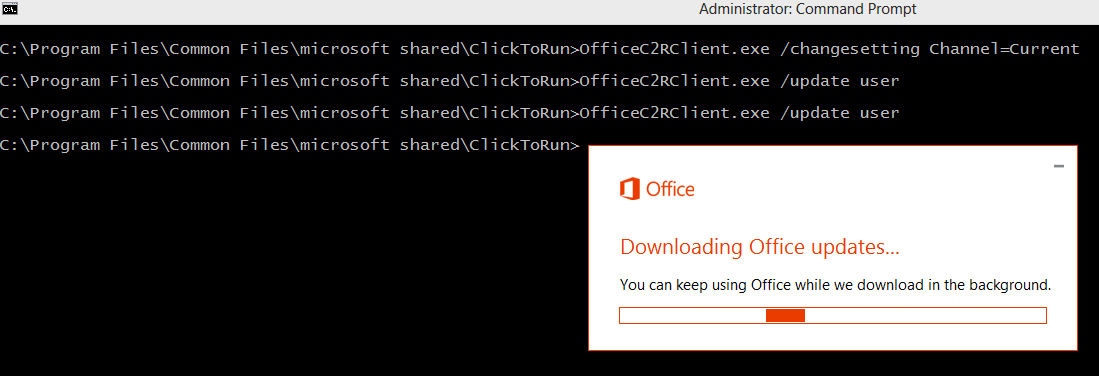
- Navigate to “C:\Program Files\Common Files\Microsoft Shared\ClickToRun"
- Run the following command to change the desired channel, let’s say Monthly Channel Targeted “OfficeC2RClient.exe /changesetting Channel=Insiders” (When running in powershell the command will be “.**OfficeC2RClient.exe /changesetting Channel=Insiders”**
or if you want to switch to the Montly channel:
“OfficeC2RClient.exe /changesetting Channel=Monthly”
Note - You can use this command to switch to any channel using the corresponding Channel keyword listed below:
| **Channel** | **Keyword in CMD or ODT** |
| Monthly Channel (Targeted) | Channel="**Insiders**" or Channel="**FirstReleaseCurrent**" |
| Monthly Channel | Channel="**Monthly**" or Channel="**Current**" |
| Semi-annual Channel (Targeted) | Channel="**Targeted**" or Channel="**FirstReleaseDeferred**" |
| Semi-annual Channel | Channel="**Broad**" or Channel="**Deferred**" |
/
It’s even possible to upgrade your Office 365 ProPlus from 32-bit to 64-bit! Check here to find out how.