

Microsoft is introducing an important architectural update to the Teams Desktop Client for Windows that enhances performance, reduces startup time, and improves the reliability of calling features. For IT administrators, UC engineers, and organizations using Microsoft Teams Calling, this update requires a few proactive adjustments.
What Is Changing?
In the current Teams architecture, the main application process ms-teams.exe also launches and manages the calling stack. To improve performance and create cleaner separation, Microsoft is introducing a dedicated child process for handling all calling-related functionality.
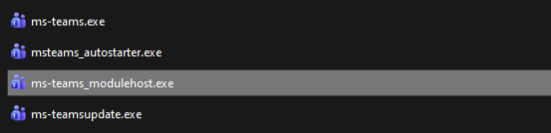
You will now see the following process structure in Task Manager:
- ms-teams.exe – main application
- ms-teams_modulehost.exe – new child process responsible for the calling stack
This change applies only to Windows clients.
Microsoft has already included ms-teams_modulehost.exe in the Teams Run directory, so organizations can begin preparing their endpoint and quality-of-service policies ahead of full enablement.
Why the Change Matters
Separating the calling stack into its own process enables:
- Faster initialization of audio and calling components
- Better overall stability during calls
- Clearer process isolation for diagnostics
- More granular policy and QoS control
- Reduced likelihood of full-client instability
For environments with strict QoS, EDR, or firewall configurations, this architectural change matters particularly because these systems often target executable names directly.
Required Administrative Actions
To avoid interruptions to Teams Calling, organizations should update their configurations as soon as possible.
1. Allowlist the New Calling Process
Add ms-teams_modulehost.exe to:
- Endpoint security tools
- Antivirus/EDR allowlists
- App control and whitelisting policies
- Firewall rules
- Monitoring systems
It must receive the same permissions currently assigned to ms-teams.exe.
Because the new executable already appears in the run directory, administrators can safely include it in policies now.
2. Duplicate QoS Settings for the New Process
If your environment applies QoS to Teams Calling, ensure that the configuration covers both executables.
Important:
- Do not remove existing QoS settings for ms-teams.exe
- Add the same QoS configuration for ms-teams_modulehost.exe
For a complete walkthrough of QoS configuration, see my earlier guide:
Quality of Service Script for Microsoft Teams
https://erwinbierens.com/quality-of-service-script-for-microsoft-teams/
Official Microsoft guidance can be found here:
https://learn.microsoft.com/en-us/microsoftteams/qos-in-teams-clients
3. Review Your Endpoint and Network Policies
Confirm that the following policies reference both processes:
- Intune device configuration and App Protection Policies
- GPO-based rules targeting Teams executables
- Firewall and routing prioritization rules
- SBC and VoIP infrastructure QoS configurations
- Local machine allowlists and application control policies
Any environment that identifies processes by name must be updated to prevent dropped calls or degraded call quality.
Final Thoughts
The introduction of ms-teams_modulehost.exe marks a significant improvement to Teams calling performance and stability. By preparing your endpoint, network, and QoS configurations now—before the new architecture becomes active—you ensure a seamless calling experience for users.