
Erwin Bierens

Knowledge is Power

Have your Microsoft Teams meeting call you back

2018-01-18 1 min read Microsoft Teams Erwin Bierens

If you’ve got a Skype for Business Audio Conferencing license, you’re now able to dial out to your own phone number from a current meeting. This allows you to transfer meeting audio to your phone if you’re having network problems, need to get in the car or on a slow connection.

/

Click the “i” icon on top of the right screen.
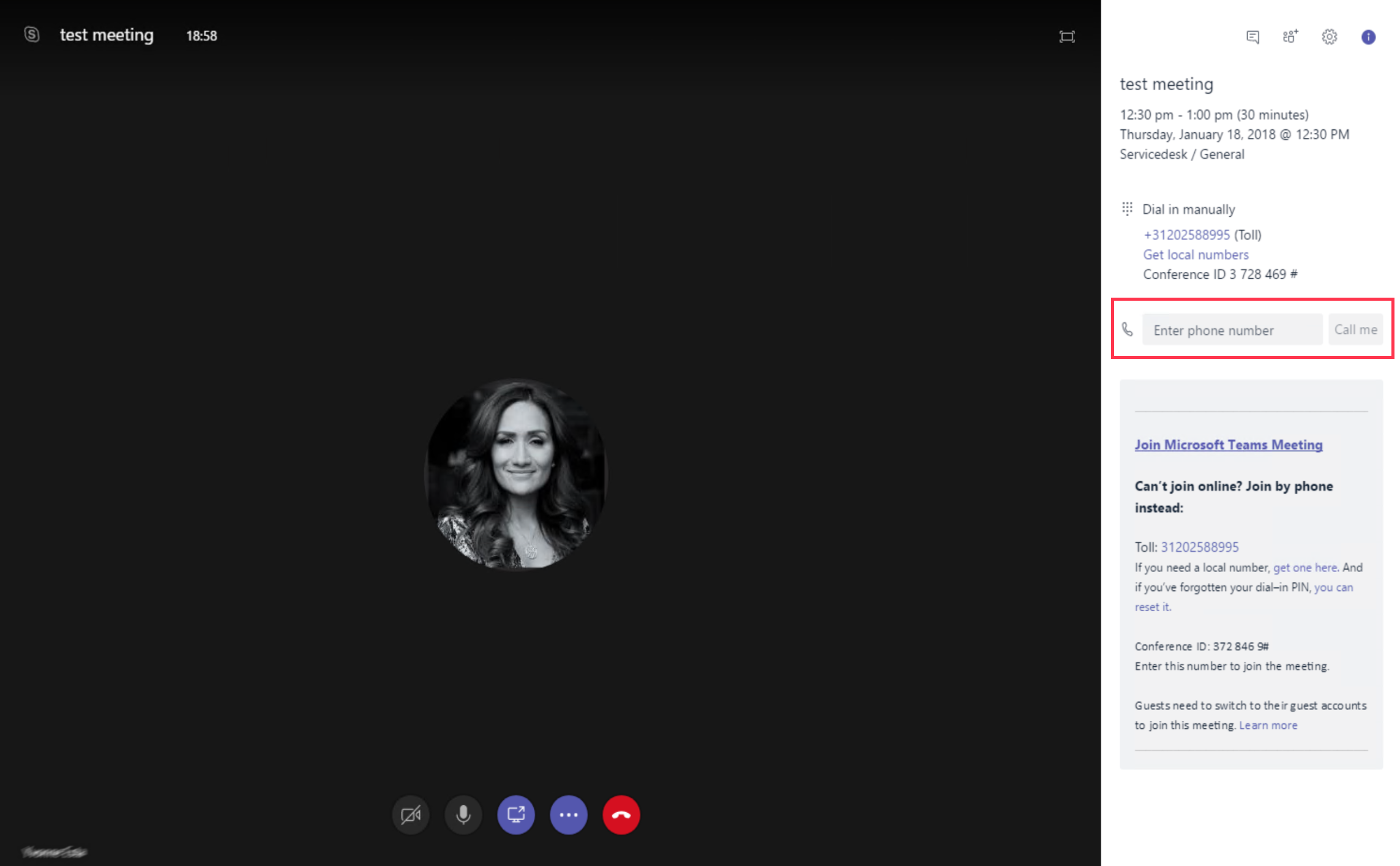
Here you can type in your own phone number.

Continue reading

Mute someone in a Microsoft Teams Meeting

2018-01-18 1 min read Microsoft Teams Erwin Bierens

Microsoft has released (Januari 17) some new features to the Microsoft Teams client.

Mute someone in a meeting

Mute individual meeting participants straight from the meeting roster to cut down on background noise. If someone has been muted, they’ll get a notification letting them know. They’ll be able to unmute themselves if they need to chime in.

Mute everyone in a meeting

If you ever need to mute all the other participants in a meeting, head to your meeting roster and select Mute all. Each individual will get a notification and be able to unmute themselves if they need to.

Continue reading

Activating Teams Calling -Microsoft Teams

2018-01-12 1 min read Microsoft Teams Erwin Bierens

This howto helps you to check/configure Calling in Microsoft Teams.

Make sure you have correct licenses on your Office365 tenant.

  • E1
  • E3
  • E5

Microsoft Phone System License (this one is included in E5) and a Calling plan (domestic or Domestic + International Calling)

/

Login to the Skype for Business Online Powershell

Make sure you have download the SkypeOnlineConnector for Powershell.

    Import-Module SkypeOnlineConnector
    $credential = Get-Credential
    $session = New-CsOnlineSession -Credential $credential -Verbose
    Import-PSSession $session
    Get-Command -Module tmp_mmdx3k5r.cuh

Check your tenant settings

Get-CsTeamsCallingPolicy

clip_image002

Continue reading

Network Assessment Tool for Skype for Business and Microsoft Teams

Network Assessment

The Microsoft Network Assessment Tool provides the ability to perform a simple test of network performance to determine how well the network would perform for a Microsoft Teams or Skype for Business Online call. The tool tests the connection to Microsoft Network Edge by streaming a set of packets to the nearest edge site and back for approximately 17 seconds for a configured number of iterations.  The tool reports:

Continue reading

Microsoft Teams - Connect to Powershell

2017-11-06 1 min read Microsoft Teams Powershell Erwin Bierens

Hi Guys,

Microsoft recently(11-2017) released the Powershell Cmdlets (still in beta), which gives you the opportunity to manage Microsoft Teams by Powershell.

Installing

To get started you wil first need to install the Microsoft Teams Powershell module. You can do this by using the following command:

    Install-Module -Name MicrosoftTeams

install-module MicrosoftTeams

Loading module

Once you have installed a module on your system, you will likely want to import the module in order to use it. Importing is the process that loads the module into active memory, so that a user can access that module in their PowerShell session. You can use the following cmdlet te import the MicrosoftTeams module.

Continue reading

Ignite News day 2

Some nice announcements about Skype for Business vNext today.

New release of “Skype for Business Server 2019” will available by the end of 2018. /

Requirements

  • Windows Server 2016
  • SQL Server 2016 Only enterprise edition will be available. You can run 1, 3,4… up to 16 front end servers. (2 front end servers not).

The directors, persistent chat role and the standard edition will be dropped. SBA/SBS don’t change.

New features in Skype for Business Server 2019

  • Call queues
  • Attendant
  • Voicemail Service

Migration

  • Server 2013 -> Server 2019
  • Server 2013 -> Server 2019

No in place upgrade available.

Continue reading

Ignite News day 1

So what’s the most interesting news on Ignite 2017 for today (so far), will update this blog!

  • Skype Operations Framework moves into Practical Guidance for Cloud Voice on Fasttrack
  • MyAdvisor will help you with setting up Voice (link)
  • Skype for Business Server will be updated second half of calendar year 2018
  • Microsoft Teams client will take over Skype for Business Online client
  • Cloud PBX renamed to Phone System
  • PSTN Conferecing renamed to Audio Conferencing

/

Continue reading
Older posts Newer posts