Erwin Bierens Blog

Knowledge is Power

Transcoding issue on the Audiocodes Mediant

I have had a issue with a customer where we have implemented Direct Routing. It’s a HA setup version 7.20A.260.095 running virtual on a VMware cluster.

The alarm says: License Pool Alarm. Some of the license pool allocations exceed maximum capability and will not be applied.

In the syslog i see the followig errors show up:

            20:11:35.145  172.20.1.1  local0.warn    [S=3603724] [SID=815d0e:57:143476]  (N  3305189)!! [ERROR] ResourceCounter: Cannot allocate more Media channel [0/0] [Time:23-11@20:11:36.770]
            20:11:35.145  172.20.1.1  local0.warn    [S=3603725] [SID=815d0e:57:143476]  (N  3305190)!! [ERROR] (#430)RTS::AllocateResource Allocate Resource - cannot allocate DSP. probably lack of resources [Time:23-11@20:11:36.770]

When i look in to my license i have transcoding assigned by the OVOC, but they are not allocated:

Continue reading

Microsoft Teams account broken

2020-10-06 1 min read Microsoft Teams     "Erwin Bierens"

How the provisioning works succesfully

By default for a pure Online user the Default state will be:

    InterpretedUserType : PureOnlineSfBUserWithTeamsLicense

Powershell Lookup

    get-csonlineuser user@microsoftteams.nl |FL SipAddress, InterpretedUserType, TeamsUpgradeEffectiveMode, EnterpriseVoiceEnabled

When you Assign Enterprise Voice and a LineUri the status will change to:

    InterpretedUserType : PureOnlineSfBUserWithTeamsLicenseNeedsProvisioningToAD

This will change to:

    InterpretedUserType : PureOnlineSfBUserWithTeamsLicenseNeedsPublishingToAAD

And finally this should result back in normal status:

    InterpretedUserType : PureOnlineSfBUserWithTeamsLicense

When this status ends in:

Continue reading

Direct Routing keeps sending Anonymous

2020-10-05 1 min read Microsoft Teams     "Erwin Bierens"

Problem

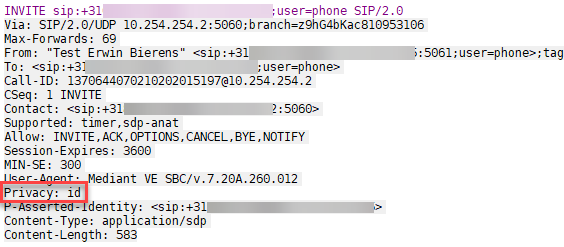
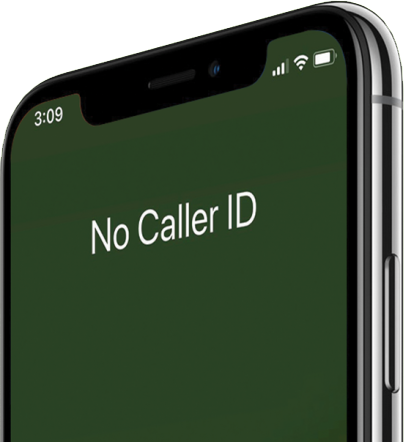
While i was configuring an Audiocdes SBC with Direct Routing setup and started testing, we faced the issue that every call outgoing is presenting Anonymous as caller ID.

Anonymous

When looking up the SDP invite i saw the parameter Privacy showing up. Privacy ID

Solution

After some digging, i found that the Privacy ID is added automatically when you enable the option -forwardPAI $true (P-Asserted-Identity) within the Set-CsOnlinePSTNGateway cmdlet.

Because i don’t want to remove the PAI, i created the following manipulation rule in the Audiocodes SBC to remove the Privacy ID. Action Subject:

Continue reading

Using Reverse Number Lookup in Microsoft Teams

2020-03-11 2 min read Microsoft Teams     "Erwin Bierens"

What is Reverse Number Lookup (RNL)

When you receive calls in your Teams client Reverse Number Lookup (RNL) will show the displayname instead of the actual phone number.

With RNL the system converts the number that is calling you to a name configured in your outlook contact or even Azure Active Directory.

The following order will be used to check and the last one will always override:

  • SIP Invite From Header
  • Azure Active Directory
  • Outlook contacts
  • Teams contacts

Requirements Exchange

The callee, in your tenant, needs to have a Exchange Online mailbox. The source object containing the phone number(s) to be matched against need to be mail-enabled in Exchange, either in Exchange Online or in Exchange on-premises with an Exchange Hybrid deployment. Mail-enabled objects are:

Continue reading

Setup Direct Routing with Microsoft teams

2019-12-09 2 min read Microsoft Teams     "Erwin Bierens"

Direct Routing lets you connect a supported, customer-provided Session Border Controller (SBC) to the Microsoft Phone System. With this capability you can configure on-premises PSTN (bring your own sip trunk, BYOT) connectivity with your Microsoft Teams client.

There are a couple of certified SBC vendors you can use to setup Direct Routing.

  • Audiocodes
  • Ribbon
  • AnyNode
  • Thinktel

What do you need?

In order to setup Direct routing you will need to have some prerequisites:

Continue reading

No RingBack when using Microsoft Teams Direct Routing

2019-10-25 3 min read Microsoft Teams     "Erwin Bierens"

Recently we have decomissioned our Microsoft Cloud Connector Edition and migrated most of our telephony users to Microsoft Teams with Direct Routing. One big issue we faced was that when a external caller called us by PSTN, they only heard one RingBack tone followed by deadly silence till someone picked up or landed in Azure VoiceMail. I Kill You

Thanks to my friend Goos Stuut, working at our local distri for Audiocodes we found out what was happening and we solved this issue.

Continue reading